
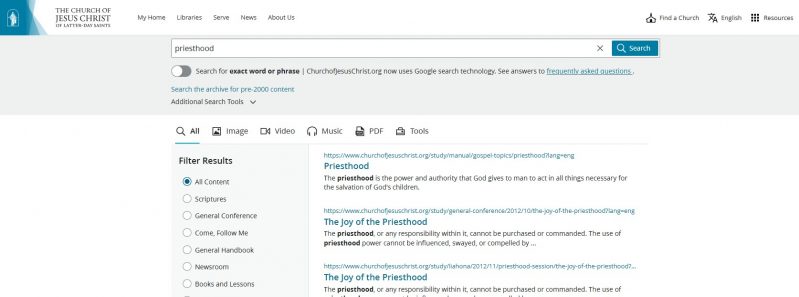
In an effort to improve the search capability, the Church website switched from old search technologies to Google as its underlying search technology in June 2022. The search tool can be accessed by clicking the magnifying glass in top right of the main navigation on the Church website or by going directly to the page ChurchofJesusChrist.org/search.
Websites Searched
The search function on ChurchofJesusChrist.org only returns results from Church-owned domains, such as ChurchofJesusChrist.org, JosephSmithPapers.org, JustServe.org, TheTabernacleChoir.org, and FamilySearch.org. The search results on the Church website and google.com should be very similar, except that results from outside websites will not be included when searching on the Church website.
Search Filters
You can filter the results to a section of the website, such as scriptures or general conference. Just click the filter along the left side of the page. Some filters allow even more specific filtering. For example, after choosing Scriptures, you can then specify Book of Mormon, then a specific book, such as 2 Nephi.
You can also filter to just see images, videos, music, PDFs, or tools by clicking the appropriate word under the search bar.
Exact Matches
You can use advanced search options directly in the search box on ChurchofJesusChrist.org. To find an exact phrase, put it within quotes. For example, “will go and do” will search for an exact match. When search phrases are not in quotes, Google will sort results by relevance. If you don’t use quotes, you may not find the exact phrase you want.
Frequently Asked Questions
Why do I sometimes see a mix of results from different languages? This tends to happen more often when you are filtering by a small section of the website where results may be sparse.
I clicked on a search result and it took me to the top of the target page. How can I find the text I searched? To find specific text on the page, press Ctrl+F (on Windows PC) or Command+F (on a Mac) on the keyboard to open the Find on Page tool in your web browser. Type the text you are looking for and then press Enter.
The Gospel Library mobile app also received significant enhancements to its search functionality in June 2022.
For technical help on other Church tools, see the Help Center on the Church’s website.